


Microsoft Power BI
Your figures, readable at a glance. In three days.
Your sources connected, a model, reports and training for your teams. Our smallest projects fit in three to ten days, and your teams leave able to evolve their reports without us.
3 d
to move from manual extracts to reporting that runs on its own
Our smallest delivered project · sources, model, reports, training
- Length of a standard project
- 3-10 d
- Connectable sources
- +200
- Projects delivered since 2019
- 100+
- Expert consultants
- 11
What we deliver
What a report we deliver looks like
The essential is read in three seconds, the context in thirty, the detail in three hundred. The key figure carries its variance to budget, the trend frames it, and a single accent colour marks the value that calls for a decision.
A real report
Ten pages you can handle right now
Nounours & Neurones makes toys. The company is invented for the demonstration, and so is the data. The way of working is not. The report is live: filters, cross navigation, drill down to the order line.
Nounours & Neurones, executive report
Source : Fictional data, generated for the demonstration
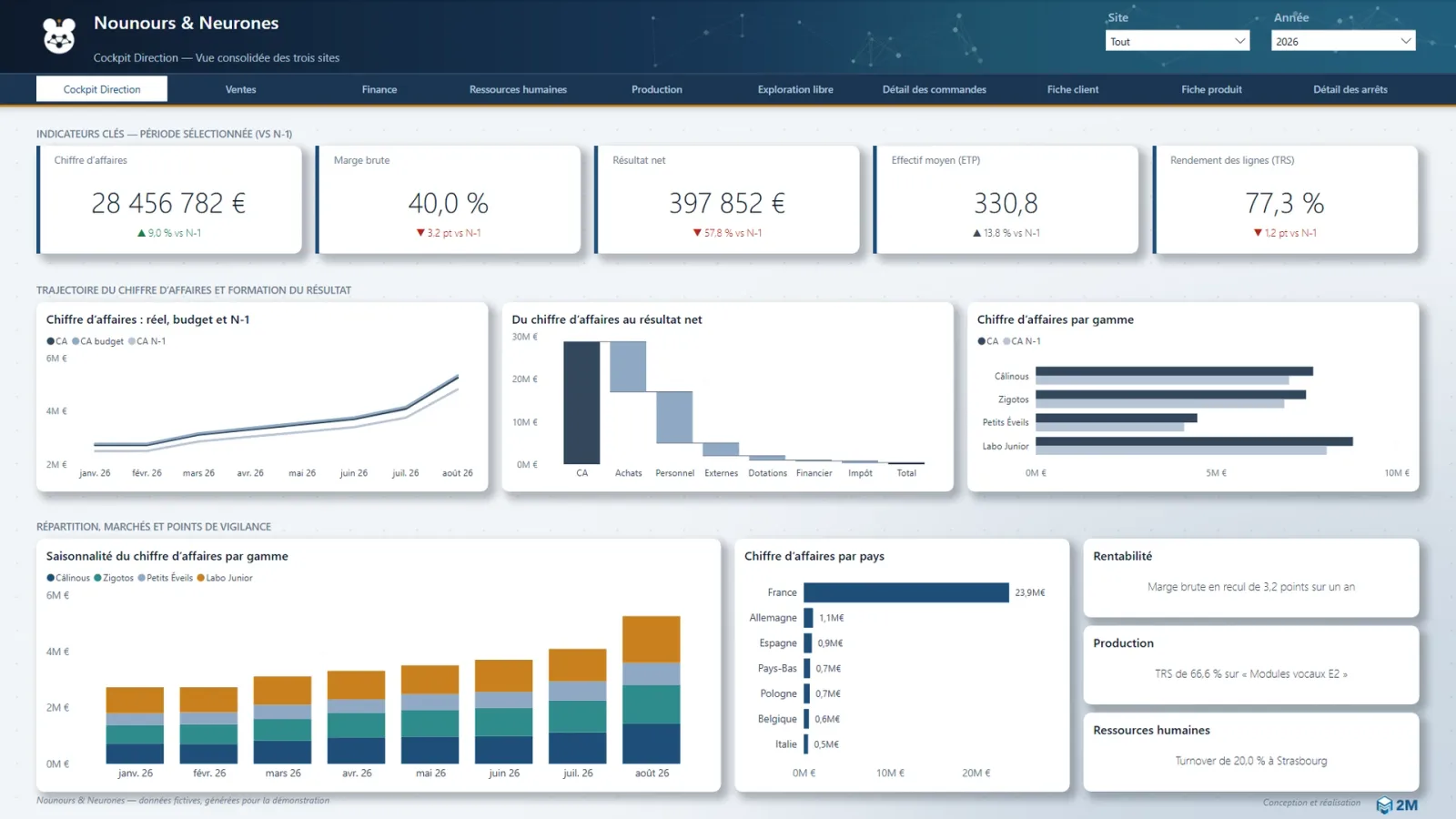
Ce rapport est publié depuis notre propre espace Power BI. Il présente :
- An executive cockpit: five indicators against budget and against last year, and a waterfall showing how the result forms.
- Four business pages, sales, finance, people and production, each with its own reading decisions.
- A free exploration page, where margin is dug into without knowing in advance what you are looking for.
- Four detail pages: orders, customer, product and line stoppages, reachable from any visual.
Chargé à la demande
Executive cockpitFive indicators against budget and against last year, then a waterfall showing how the result forms. In one screen, the board sees where the revenue comes from and where it is lost. Free explorationA decomposition tree where margin is dug into by range, channel, site, item or country, without knowing in advance what you are looking for. This is where the report stops being a dashboard and becomes an instrument of enquiry. Order detailThe order line, reached from any visual on the pages before it. An aggregated figure stays checkable right down to its source. ProductionLine yield, scrap and availability. Overall equipment effectiveness breaks down to the line that is pulling it down.
Nounours & Neurones has never sold a single teddy bear: the company is invented, so are its factories, and its finance director sleeps very well. The report, on the other hand, looks a great deal like the ones we deliver: the same reading rules, the same layout decisions, the same drill down to the order line. Only the figures were replaced by its own.
What changes
A table is scanned. A report is understood.
The same figures, read in a second
On the left, every row has to be read to find the month that dips. On the right, it is seen without reading. That is the whole work of a well-designed report.
What it does well
What Power BI does better than anything else
| What it changes day to day | |
|---|---|
| Visualisation | Turning raw figures into information readable at a glance, without going through a developer. |
| Sharing | Giving the whole team access to the same figures through a web interface, instead of sending files that get lost. |
| Exploration | Clicking inside a visual to understand where a variance comes from, instead of asking for another extract and waiting two days. |
What makes the difference
What we check before quoting
| What we do about it | |
|---|---|
| Volumes and source technology | Performance depends heavily on what sits behind. A slow ERP or a badly indexed database does not become fast because Power BI is put in front of it. |
| Complex business rules | Power BI is not made to carry elaborate business logic. When a rule becomes serious it has to live upstream, otherwise it is recoded in every report and the versions diverge. |
| A heterogeneous information system | The more numerous and different the sources, the more expensive the build becomes. That is the tipping point towards a real data platform. |
The trade-off
When Power BI is enough, and when Fabric is needed
We gave this question a page of its own: the three signals that justify the move. Here is the summary.
A Power BI only architecture, dataflows, models and reports, works very well up to a point. Here is what it brings, and what it ends up costing.
| Power BI alone | With Microsoft Fabric | |
|---|---|---|
| Consistency of the figures | One business model can serve several reports, as long as the discipline holds. | Business rules are centralised upstream: they can no longer diverge. |
| Refresh | Dataflows and models refresh at different moments, within a limit of eight refreshes a day on a Pro licence. | A chain orchestrated end to end, with no imposed asynchrony. |
| Diagnosis | When a link breaks, finding which one takes experience and time. | Monitoring and lineage built into the platform. |
| Governance | Risk of drift as dataflows and datasets multiply with no naming standard and no owner. | Git versioning, deployment pipelines, explicit ownership. |
| Setup cost | Low. A standard project fits in 3 to 10 days. | Higher, and justified only beyond a certain level of complexity. |
Our standard projects
What a three to ten day project looks like
This is our most frequent format, and the most underrated on the market. In one or two weeks, a team moves from manual extracts to reporting that runs on its own.
| Step | Deliverable |
|---|---|
| Connection | The source wired in: Sage 100, Sage 1000, Salesforce, Business Central, Dynamics NAV, Lucca, Kinnovis, M-Files, Harvest, a SQL database or bespoke line-of-business software. |
| Preparation | A reusable dataflow: preparation is done once, in the right place, rather than copied into every report. |
| Modelling | A semantic model with its relationships and its measures, the part that decides whether your figures will be right. |
| Reporting | Reports designed to be read, not to impress in a demonstration. |
| Handover | Training for your teams, so that they evolve the reports without us. |
Frequently asked
What people ask us most
When is Power BI on its own genuinely enough?
At what point should we move to Microsoft Fabric?
How long does a Power BI project take?
Which sources do you connect to Power BI?
Do you train the teams on Power BI?
What happens to our existing Power BI reports?
Two hours to find out what you actually need.


Eleven expert consultantsSaint-Priest, near Lyon, France
A scoping workshop with a certified consultant, without commitment. We look at your sources and your indicators, and we tell you straight whether your need fits in three days or calls for more.
Request a scoping workshopScoping workshop · 2 hours · free